
A plain-language reference for every DrezSync feature: what it does, how it works, and who it is for.
Free features
Time-slot booking
DrezSync lets a visitor pick a date and then choose from the open times you offer. You set your open days, your hours, and how long each slot is, for example 30 minutes, and the form shows only the times that fit. This is the core booking flow, ideal for appointments, consultations, and services.
Google Calendar sync
DrezSync connects to your own Google Calendar. Every booking made through the form is written to that calendar as an event, and the form reads that same calendar to know what is already taken. Nothing lives in a separate system, so your calendar stays the single source of truth.
Auto-block booked times
Because DrezSync reads your calendar in real time, any time that already has an event is hidden from the form. A customer can never pick a slot that is taken, so you avoid double bookings without doing anything.
One or more booking fields per form
Adding booking to a form takes a single field. Drag the DrezSync Booking field onto any Gravity Form, set its rules, and it handles the date and time together. You can add more than one booking field to the same form, each with its own calendar and its own rules, so a spa could book a massage and a facial on one form, or a tour operator a morning and an afternoon activity. Each booking is independent, so they never conflict.
Custom accent color
The selected time button uses a color you choose, so the booking form matches your brand rather than ours. You set it once in the field settings, and each form can have its own color.
Pro features
Date-range booking for rentals
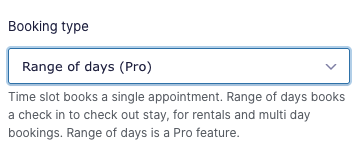
Instead of a single time slot, customers pick a start date and an end date, for example a check-in and a check-out. This suits vacation rentals, equipment hire, and any booking that spans multiple days. DrezSync blocks ranges that overlap existing bookings, the same way it blocks single slots.
Slot capacity for group bookings
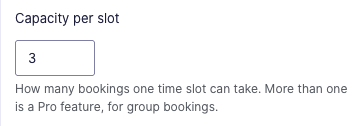
By default a time slot holds one booking. With capacity, you set how many bookings a slot can take, for example twelve seats in a class or eight spots on a tour. The slot stays open until it reaches that number, then it closes. This turns DrezSync from one-at-a-time appointments into group scheduling.
Custom event titles and customer invites
Choose what each calendar event is called, using the details the customer entered, for example “Consultation with Jane Smith” instead of the form name. You can also have DrezSync add the customer as a guest, so Google sends them their own calendar invite and reminder.
Priority support
Pro subscribers get direct email support included with the subscription, for help with setup and with how the plugin behaves on your site.