
Category: FTP & File Transfer • Est. reading time: 2 minutes
An FTP account is a login that lets you, or someone you trust, move files to and from your server. Creating a separate account for each person is safer than sharing one, because you can limit where they can go and remove their access later without disturbing anyone else.
The Steps
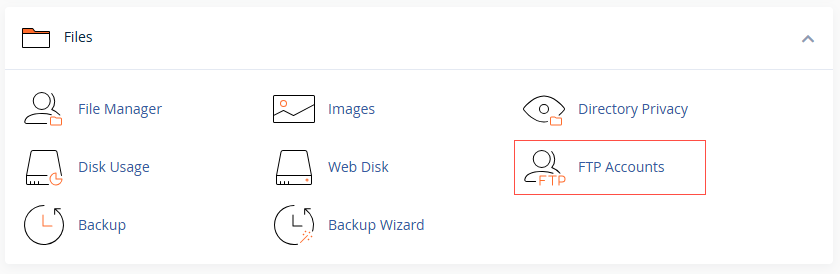
1. Log in to cPanel and, in the Files section, open FTP Accounts.
2. Enter a Log In name and choose your domain.
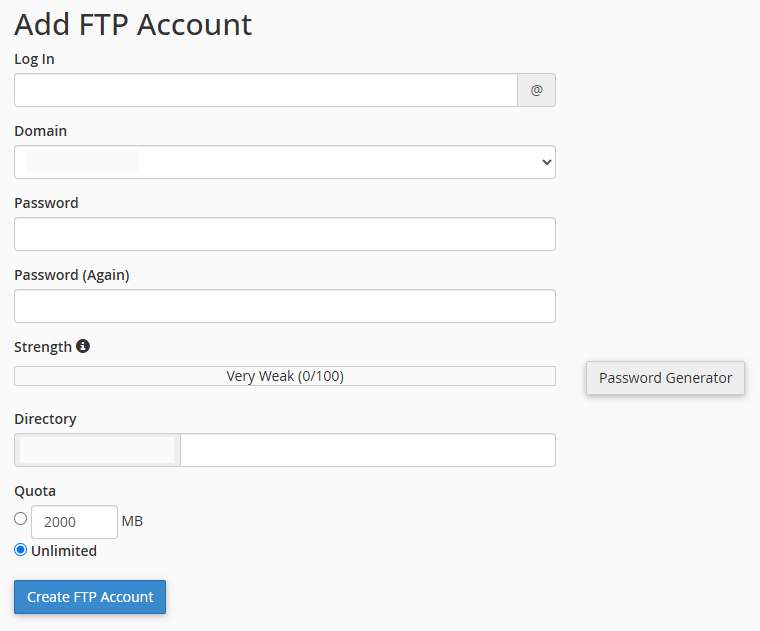
3. Set a strong Password, or use the generator.
4. Set the Directory to limit where this account can reach. Restricting it to a single folder is good practice.
5. Set a Quota if you want to cap storage, then click Create FTP Account.
Our advice: give each person their own account, lock it to the folder they actually need, and use a strong password. It keeps your server tidy and secure.
Setting someone up and want it done right? Reach us at support@allydrez.com or 1-321-209-2004.
created FTP account like: