Category: WordPress • Est. reading time: 2 minutes
Your username is what you log in with, and for security it should never be shown publicly. Your display name is the friendly name that appears on your posts and comments. Here is the good news: you can change the display name anytime without touching your username.
The Steps
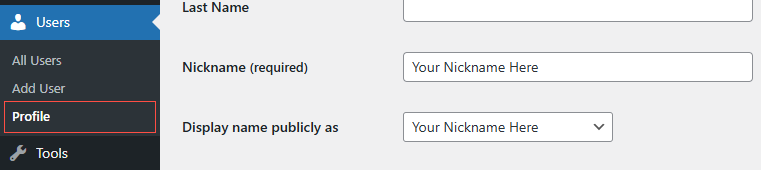
1. Log in and go to Users, then Profile. (To change someone else’s, open All Users and edit their account.)
2. If you want a custom name that is not already listed, first type it into the Nickname field. This is the trick most people miss.hboard menu, hover your mouse over Users and then click on Profile.
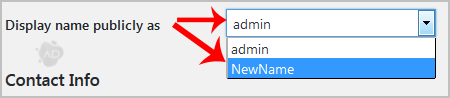
3. Now open the Display name publicly as dropdown and choose the name you want shown.
4. Scroll down and click Update Profile.
Why this matters: if your display name is the same as your login username, you are handing hackers half of what they need to break in. Keep them different.
Need a Hand?
We teach WordPress live and one-on-one at allydrez.com/learn-how-to-use-wordpress, or we will manage your site for you. Reach us at support@allydrez.com or 1-321-209-2004.