
Category: WordPress • Est. reading time: 1 minute
Whether you are tightening up security or you simply got locked out, changing a WordPress password is quick. There are three ways to do it, depending on whether you can still log in.
If You Are Logged In
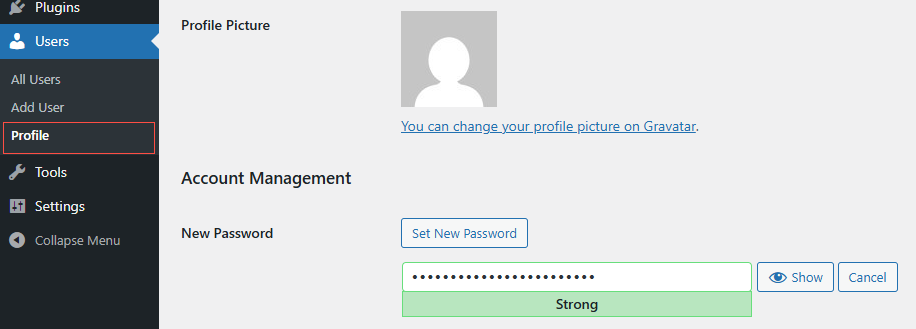
- Go to Users, then Profile.
- Scroll to the Account Management section and click Set New Password.
- WordPress suggests a strong password. Keep it, or type your own.
- Click Update Profile.
If You Are Locked Out
On the login screen, click Lost your password?, enter your username or email, and WordPress emails you a reset link. Follow it to set a new password.
If You Are an Admin Resetting Someone Else
Go to Users, open the person’s account, and use Set New Password, or send them a reset link. This is handy when a team member is stuck.
Make it a strong one: long, unique, and not reused from another site. A password manager makes this painless, and it is one of the simplest ways to keep your site safe.
Need a Hand?
We teach WordPress live and one-on-one at allydrez.com/learn-how-to-use-wordpress , or we will manage your site for you. Reach us at support@allydrez.com or 1-321-209-2004.